
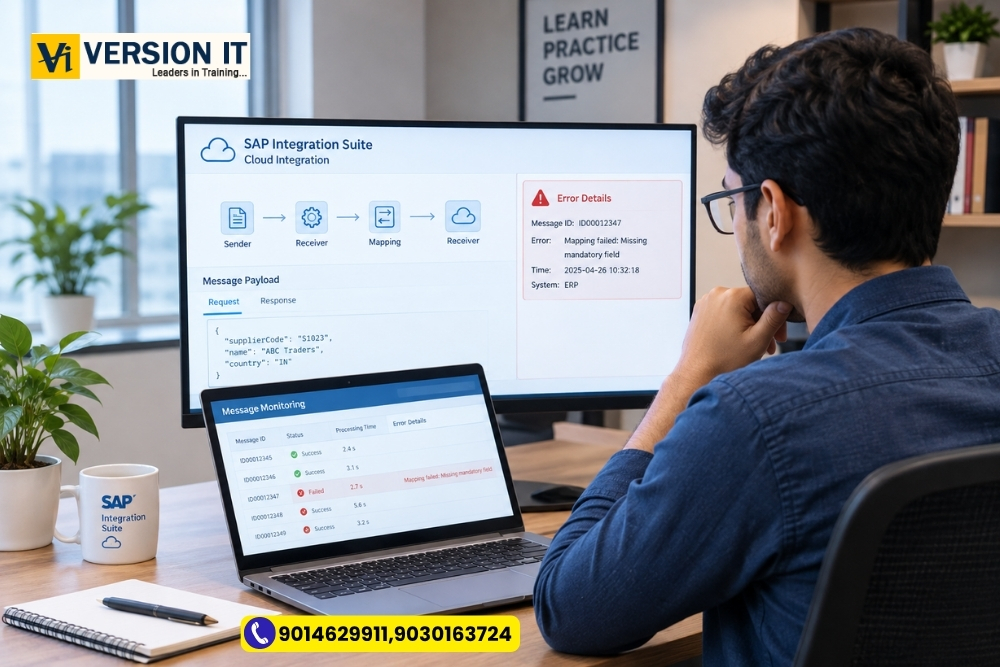
An integration flow can run successfully for several days, and then fail at random times. A business application passes data on, but doesn’t do anything with it. Sometimes the issue is that there are missing data. Otherwise, some credential expired, a mapping rule was not correct or there was a temporary connection problem.
The crucial job of an integration consultant is not to just get rid of the error. Understanding the cause of the failure, which messages have been affected and to ensure that duplicate or incorrect records are not created due to the business process.
In fact, students who have taken SAP CPI Training in Bangalore must learn how to monitor and troubleshoot too, as it is not merely designing integration flows, monitoring and troubleshooting too.
What are the causes of Integration Message Failure?
There are several steps in the way of a message in order to reach its intended audience. May require to be received, validated, transformed, routed, and delivered. Any problem at any time can interrupt processing.
Suppose a company transfers supplier data from one application to another. A supplier record is sent from the source application and the target system is expecting a tax registration number, but it is not sent in the record. The record might be rejected by the receiving application.
Other common causes are:
- A problem in mapping fields from the source to the destination structure.
- Authentication/authorization failures.
- Issues with the network or connectivity.
- Unexpected XML/JSON formats.
- If the mandatory fields are not filled in or the values are incorrect.
- Identify and focus targeted applications that are out for a period of time.
- A situation where routing conditions are incorrect in an integration flow.
If the consultant is aware of these possibilities, they can approach an investigation of an issue in a logical manner rather than simply altering configuration, without understanding the cause.
How to Investigate a Failed Message?
It’s better to run an integration flow a bunch of times than to make a systematic investigation. Monitoring Tools are provided in the Cloud Integration capability of SAP Integration Suite to let authorised users examine the information about the message processing and determine the cause of the error.
-
Review the Message Status.
First, find the affected message, and then check on the processing status. Identify if the failure occurred in the past or the present and if it is a single or multiple message failure.
When only one supplier record fails and the others succeed, the issue could be connected to the data in the failed record. If a large number of messages fail at around the same time, there might be a shared dependency or connection or there may be something wrong with the configuration.
-
The Error Details will show.The Error Details will be displayed.
Then, review the information about the errors. An error message could contain a failed authentication, a required field missing, or an inability to connect to the destination.
The message is to be used as a clue, rather than an explanation at all times. For instance if the connection and destination configuration are incorrect, the general delivery error may be the result of the further investigation.
It is important that students learn to link an error message to a stage in the message.
-
Review the contents of the Message Structure.
When working with data transformation, make sure to compare the data structure in the source with the data structure that is expected in the target.
The field supplierCode will not be mapped if the target has a field supplierIdentifier. If the mapping is not present or it is incorrect, the receiving application may not be able to get the value that it needs.
Check the mapping rules, required fields, data types and expected format. Review the content of the messages using test data and refer to the organisation’s security policies.
-
Conduct a Check of Connectivity and Access.
If an integration flow is unable to communicate with its destination, review the corresponding connection settings, endpoint, authentication, and permissions.
Not all delivery failures are caused by a mapping change. If the message is properly structured, but the destination is not available, then changing the transformation logic will not resolve the issue.
-
Test the Correction
After finding and fixing the cause, retest the flow with an appropriate test message. Make sure the message is delivered to the proper recipient and that the receiving application is able to receive the message.
Take into account if any other messages were impacted by the same concern. Even if the test is a success, it is still beneficial evidence and the integration should be followed after the correction.
Why messages need to be reprocessed.Why reprocessing messages is important.
A frequent error is resending a failed message without verifying that the original message was partially successful.
Suppose the target system received an order, but the acknowledgement didn’t come back. The transaction might be regarded as a failure though the order might already have been created at the target. If it is sent again without proper precautions, it may result in a duplicate.
This is why it is important to perform business-level checks as well as technical checks: Check the real state of a message in the receiving application before reprocessing it and follow recovery procedure of the organisation.
Duplication protection, unique transaction identifiers or idempotent processing may be used to avoid the processing of duplicate transactions, depending on the integration design.
This is a Practice Exercise for Students.
It is helpful to develop a sample integration flow to move product information from one system or test endpoint to another.
Send a valid message and acknowledge its completion. Add a controlled problem, like removing a mandatory field or mapping the wrong one. Watch the error that occurs, determine the reason for the error, fix the configuration and test again.
In another exercise, try to mimic a destination connection failure and compare the symptoms with a data-mapping failure.
The exercises provide training for students to differentiate between various types of errors. They also offer the opportunity for the problem to be well documented, the steps of the investigation to be well documented, the steps of the correction to be well documented, and the results of the last test step to be well documented.
The list of what should be included in SAP CPI training.
When comparing courses consider more than the number of topics in the syllabus. Question whether training is provided for integrating, monitoring, mapping, connecting, and handling errors.
An effective learning experience will tell students why the error has arisen, how to try to discover the cause, and how to check to see if the correction has been successful. Pupils should also be taught to communicate technical answers successfully, particularly in circumstances where a situation impacts a business transaction.
Current students interested in pursuing SAP CPI Training Course in Bangalore can ask about the practical situations SAP CPI deals with, the tools they demonstrated and where they get a chance to practice troubleshooting. Please check course details directly for confirmation of current syllabus and hands on.
Final Thoughts
Integration troubleshooting is an art that is learned by observing, testing and carefully analysing. For a message to fail, the integration flow is not necessarily incorrect. It may be a data issue, connection issue, mapping issue or a transaction that needs to be carefully recovered.
For the learners who wish to know about SAP CPI Training in Bangalore, practicing these scenarios might give them a better idea of what integration entails. An important prerequisite to enterprise integration technology is understanding why, how and what to do to get the right answer.