
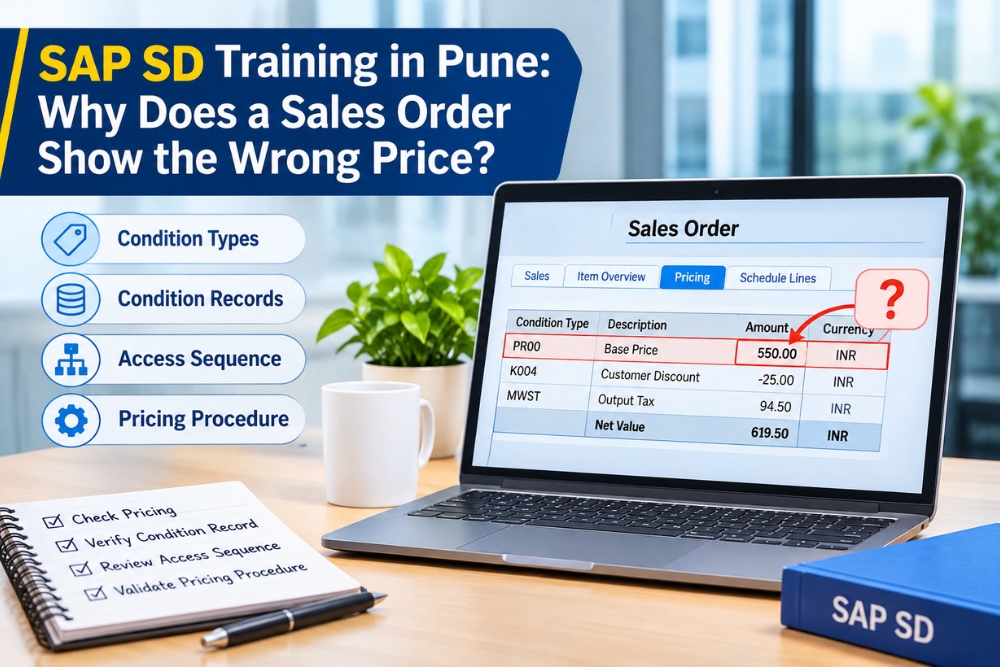
A customer agrees to buy 100 products at ₹500 per unit. The sales team creates the order in SAP. However, the system displays ₹550 instead of ₹500.
The sales representative checks the customer details and product information. Everything looks correct. Still, the price is different.
Why does this happen?
In SAP Sales and Distribution (SAP SD), pricing depends on several settings. These include condition types, condition records, access sequences, and pricing procedures.
For students interested in SAP SD Training in Pune, understanding these settings is important. They help explain how SAP calculates prices in sales orders.
Let’s investigate this pricing problem step by step.
First, Understand How SAP Calculates a Price
SAP does not always take the selling price from a single field. Instead, it follows a configured pricing process.
This process identifies the relevant price and applies other conditions. For example, the system may include discounts, surcharges, and taxes.
Consider a company that sells industrial products. It offers different prices to different customers. Therefore, the sales team needs accurate pricing information for every order.
SAP uses condition records to store this information. It then uses the pricing procedure to calculate the final amount.
As a result, even a small configuration issue can affect the sales order value.
Check 1: Is the Correct Condition Type Used?
A condition type represents one element of pricing in SAP.
For example, a condition type may represent the basic selling price. Another may represent a discount or tax.
Some commonly used condition types include:
- PR00: Standard price in many SAP pricing configurations.
- K004: Material discount.
- K007: Customer discount.
- MWST: Output tax in relevant configurations.
The exact condition types depend on the company’s SAP setup.
Now return to our example. The expected price is ₹500, but SAP shows ₹550.
First, the consultant should open the pricing conditions in the sales order. Then, the consultant should identify which condition type provides the unexpected amount.
This is the first step towards finding the actual cause.
Check 2: Is the Condition Record Correct?
Condition records store pricing information for specific business combinations.
For example, a company may maintain a separate price for a customer and material. It may also maintain prices for different sales organisations or distribution channels.
However, an incorrect or outdated record can produce an unexpected result.
The consultant should check these details:
- Customer and material information.
- Sales organisation and distribution channel.
- Maintained price.
- Valid-from date.
- Valid-to date.
SAP provides useful transactions for checking these records.
- VK11 – Create condition records.
- VK12 – Change condition records.
- VK13 – Display condition records.
For instance, a price of ₹550 may have become valid at the beginning of the month. The earlier price of ₹500 may have expired.
In that situation, SAP may be selecting the correct record. The sales team may simply be using an outdated quotation.
Therefore, always check the validity dates before changing the configuration.
Check 3: How Does SAP Find the Price?
SAP uses an access sequence to search for the required condition record.
An access sequence defines the search order for a condition type. It tells SAP which combinations to check.
For example, SAP may first search for a customer-specific material price. If no matching record exists, it may check another configured combination.
The search order depends on the company’s configuration.
This detail is important when a customer expects a special price. However, SAP selects a general price instead.
The consultant should review the access sequence and identify which search condition successfully found the record.
This helps explain why SAP selected one price instead of another.
Check 4: Review the Pricing Procedure
The pricing procedure brings different pricing conditions together.
It controls how SAP calculates the value of a sales document. It also determines the order in which pricing elements are considered.
Let’s look at a simple example.
- Base price: ₹500
- Discount: ₹25
- Taxable value: ₹475
- Illustrative tax at 18%: ₹85.50
- Final value: ₹560.50
This example shows how discounts and taxes can affect the final amount. Actual calculations depend on the company’s tax rules and SAP configuration.
Consultants commonly use transaction V/08 to maintain pricing procedures in SAP GUI.
They may also work with related configuration:
- V/06: Condition types.
- V/07: Access sequences.
- V/08: Pricing procedures.
However, changing a pricing procedure without understanding the complete setup can cause further problems.
Therefore, consultants should investigate the full pricing flow before making changes.
How to Investigate a Pricing Error in SAP
A good consultant follows a clear process. Random changes can create more problems.
Use these steps to investigate the original sales order.
Step 1: Display the Sales Order
Use transaction VA03 to display the existing sales order. Check the customer, material, quantity, and item details.
Step 2: Open the Pricing Conditions
Review the pricing conditions for the affected item. Identify the base price, discounts, and other charges.
Step 3: Check the Pricing Analysis
Use the pricing analysis to understand how SAP determined each condition. It can help identify the selected access and missing condition records.
Step 4: Verify the Condition Record
Check the customer, material, price, and validity dates. Also, confirm that the correct record exists.
Step 5: Review the Configuration
If the condition record is correct, examine the condition type, access sequence, and pricing procedure.
Step 6: Test the Correction
Make approved changes in the appropriate test environment. Then, create or update a test sales order and verify the result.
This method helps consultants find the actual reason for a pricing difference.
A Practical Exercise for SAP SD Students
Students can practise this scenario in a suitable SAP training system.
A customer orders 20 units of a product. The expected price is ₹500 per unit. However, SAP displays ₹550.
Try answering these questions:
- Which condition type determines the base price?
- Does a customer-specific condition record exist?
- Is the record valid on the order date?
- Which access sequence does the condition type use?
- Which access finds the condition record?
- Which pricing procedure applies to the sales document?
- Are discounts or additional charges affecting the final amount?
First, identify the reason for the difference. Then, decide what needs to be checked or corrected.
This exercise helps students understand pricing logic instead of simply memorising transaction codes.
Where SAP SD Pricing Knowledge Is Useful
Pricing plays an important role in sales orders and billing. Companies need accurate prices to prepare quotations, process orders, and generate customer invoices.
Pune has businesses across manufacturing, automotive, distribution, engineering, and IT services. Many organisations use enterprise software to manage their sales processes.
Therefore, SAP SD knowledge can be relevant to roles such as:
- SAP SD Consultant.
- SAP Functional Support Analyst.
- Sales Operations Analyst.
- SAP Order Management Consultant.
The responsibilities vary between companies. Some roles focus on daily sales operations. Others involve configuration, testing, and business process support.
A good understanding of pricing can help learners prepare for these activities.
What Should You Learn Before Working on Pricing?
Students should first understand the basic sales process. This includes inquiries, quotations, sales orders, deliveries, and billing.
After that, they can study condition types, condition records, access sequences, and pricing procedures.
It is also useful to practise sales order creation and pricing analysis.
Before joining a course, check whether the syllabus includes these topics. Ask about practical system access, training format, trainer experience, and business scenarios.
At Version IT, students interested in SAP SD Training in Pune can enquire about the syllabus, practical sessions, available batches, and training format before enrolling.
Final Thoughts
An incorrect sales order price can have several causes. It may come from a condition record, validity date, access sequence, or pricing procedure.
Therefore, SAP SD consultants must understand how these elements work together.
By practising real pricing scenarios, students can improve their understanding of sales processes and SAP configuration.
SAP SD Training in Pune can be a starting point for learners who want to build knowledge of sales order management and pricing determination.